Boosting Instagram Posts with a WhatsApp Button: A Complete Guide
In today's conversational commerce landscape, businesses want prospects to reach them instantly — and nothing beats the immediacy of a WhatsApp chat. Instagram's paid promotion tools now let you turn any organic post into an ad that opens a WhatsApp conversation the moment someone taps "Send WhatsApp Message." Here's how the architecture works, and how to set it up.
Understanding the architecture
Before boosting, it helps to see how the pieces connect. Three separate systems have to be linked together before Instagram can generate a working WhatsApp CTA: your Instagram Professional account, the Facebook Page it's tied to, and your verified WhatsApp Business number. Once linked, Meta's ad platform (used behind the scenes when you tap "Boost Post") treats WhatsApp as a messaging destination, just like Instagram or Messenger inboxes.
Step 1: Prepare your accounts
You'll need an Instagram Professional (Business) account, a WhatsApp Business account, and your Instagram linked to a Facebook Page. Your WhatsApp Business number must also be connected to that Instagram/Facebook identity — this connection is what makes WhatsApp appear as an option later.
Step 2: Connect WhatsApp to Instagram
Open Instagram, go to your profile, and tap Edit Profile. From there, navigate to Contact Options (sometimes nested under Business Information). Select WhatsApp Business Number, enter your number, and verify it via OTP. Save your changes — this single link is the backbone of the entire flow, since without it, WhatsApp won't show up as a boost destination.
Step 3: Boost your post
Open the post you want to promote and tap Boost Post. Choose "More messages" as your goal, then select WhatsApp specifically as the destination — if prompted, confirm the WhatsApp Business connection again. Next, define your audience: Automatic lets Instagram find similar users based on your existing engagement, while Create Your Own lets you target by location, age, and interests. Set your daily budget and campaign duration, review everything, and complete payment. Submit for review.
What happens after approval
Once Meta approves your ad, it displays a WhatsApp CTA button (typically "Send WhatsApp Message"). Tapping it opens a chat directly with your business number — no extra app switching, no lost leads to a landing page that might not convert.
Below is a simplified view of how data flows from your Instagram post through to a live WhatsApp conversation.
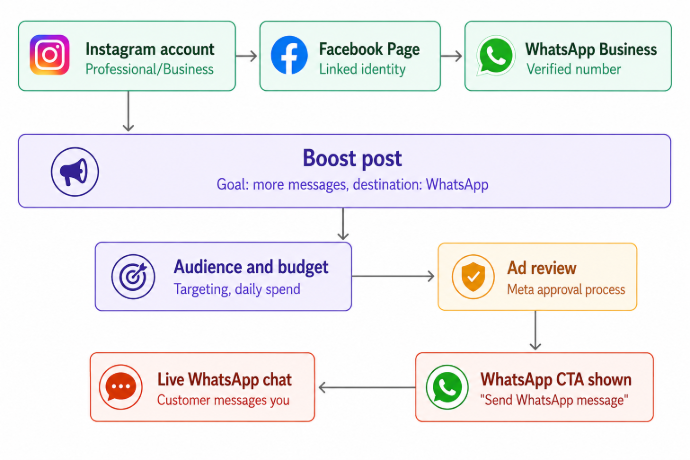
The diagram above traces the full pipeline: your Instagram account, Facebook Page, and WhatsApp number are linked first, then that linked identity feeds into the Boost Post flow, where audience/budget settings and Meta's ad review happen in parallel-to-sequential order, ultimately surfacing the WhatsApp CTA button that opens a live chat.
Why this matters for conversions
A WhatsApp CTA collapses the funnel — instead of "see ad → visit website → find contact form → wait for email reply," it's "see ad → tap → chat now." For businesses selling services, handling bookings, or fielding quick product questions, that immediacy often translates directly into higher response rates and faster deal cycles.
If you run into WhatsApp not appearing as a boost option, the fix is almost always back at Step 2 — the number verification link is either missing or was done on the wrong linked Facebook Page.