
OpenClaw: How an Open-Source AI Agent Is Redefining Automation
For most of the last decade, "AI automation" meant writing a script that triggered on a schedule, or wiring up a chatbot that could answer questions but never actually touch your files, your calendar, or your inbox. OpenClaw breaks that pattern. It is an open-source personal AI agent that runs on your own machine, talks to you through the apps you already use, and is allowed to actually do things: send messages, edit files, run shell commands, browse the web, and even write its own new capabilities when it hits a task it can't yet handle. Launched quietly in early 2026 by PSPDFKit founder Peter Steinberger, the project went viral almost overnight and has since become one of the fastest-growing open-source repositories on GitHub, affectionately nicknamed "Molty" by its community.
What Exactly Is OpenClaw?
At its core, OpenClaw is a local-first automation gateway. Instead of living inside a single app, it sits on your computer and connects outward to the messaging platforms you already check every day — WhatsApp, Telegram, Slack, Discord, Signal, iMessage, and dozens more. You talk to it the same way you'd talk to a colleague, and it replies, but it doesn't stop at replying. It can open a browser and fill out a form, read and rewrite a document, or kick off a multi-step workflow that runs in the background while you do something else entirely.
Three design choices set it apart from typical AI chat assistants. It is fully open-source under the MIT license, so anyone can inspect or modify the code. It is model-agnostic, meaning you can point it at Claude, GPT, or a model running entirely on your own hardware through a tool like Ollama. And it is local-first: rather than storing your preferences and history in some company's cloud database, it keeps that information in plain Markdown files sitting on your own disk.
The Architecture: How a Message Becomes an Action
It helps to picture the system as a loop rather than a single program. The diagram below traces that loop from the moment a message arrives to the moment a task is actually completed.
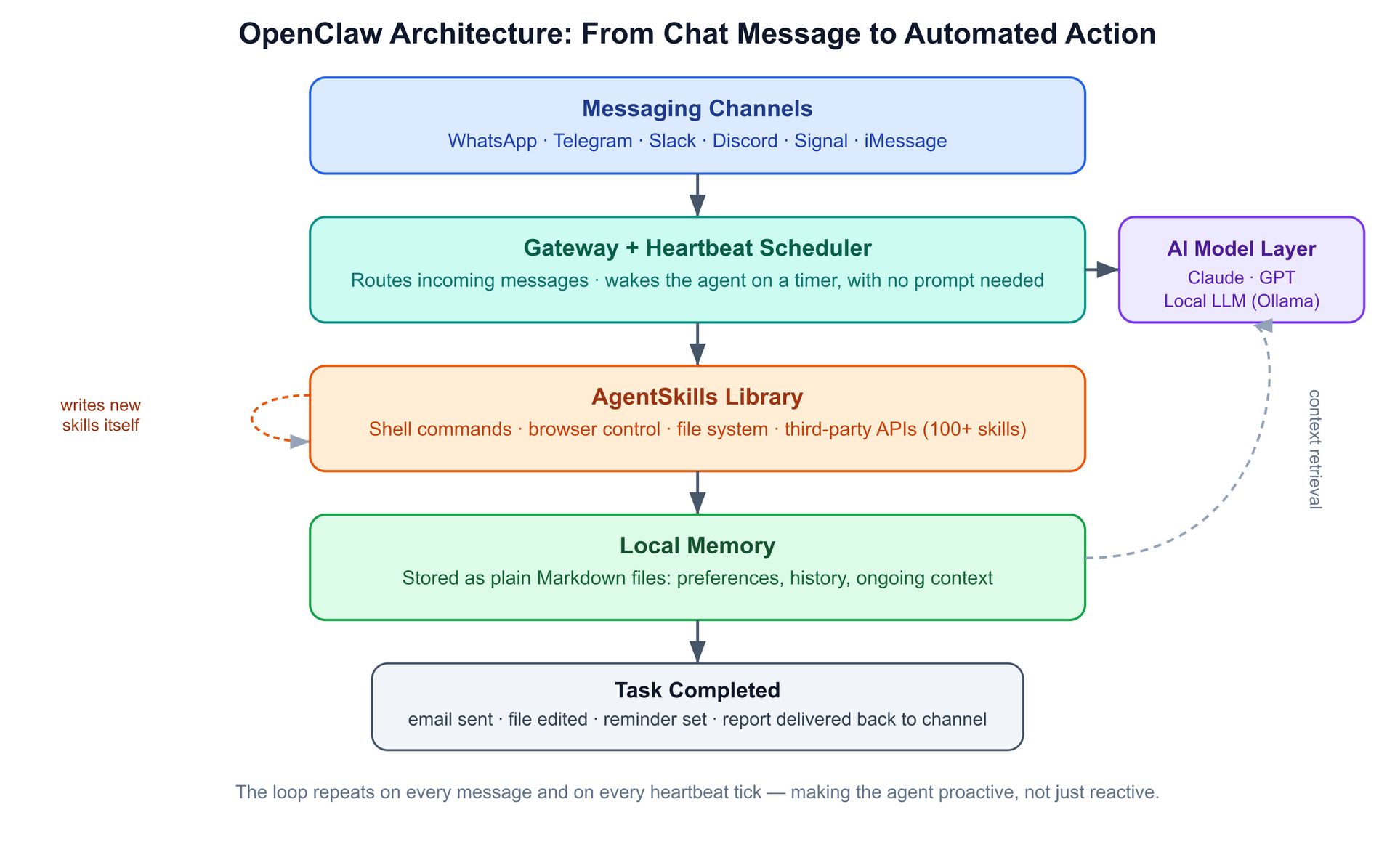
A message from any connected channel first lands at the gateway, which doubles as a heartbeat scheduler. That heartbeat is what makes the agent proactive rather than purely reactive — it can wake itself up on a timer, check on a long-running task, or send you a reminder without ever being asked. The gateway forwards the request to whichever AI model you've configured, which decides what needs to happen and which skill should handle it. That decision gets passed down to the AgentSkills library, a growing collection of more than a hundred prebuilt capabilities covering shell access, browser control, file operations, and connections to third-party APIs. If no existing skill fits the job, the agent can write a brand-new one on the fly, which is the behavior people often describe as "self-improving." Finally, everything that happens — preferences you've stated, context from past conversations, results from completed tasks — gets written into local memory as Markdown files, which the AI model reads back into context the next time it needs it. The result is delivered back into whichever chat app you started from.
What Makes It Different From a Regular Chatbot
A typical chatbot answers a question and forgets you the moment the conversation ends. OpenClaw is built around the opposite assumption: that a personal assistant should accumulate context over time and act on it without constant supervision. That shows up in a few concrete ways. The heartbeat scheduler lets it check in on things periodically instead of only responding when spoken to. The memory system means it genuinely remembers your preferences, your ongoing projects, and your past requests, because that information is sitting in editable files rather than buried in a database you can't see. And because skills are just code, the agent can extend itself, building a custom integration for a tool that has no official API simply because you asked it to once.
Real-World Ways People Are Using It
In practice, the use cases tend to fall into two buckets: things that run continuously and things that run once but are too tedious to do by hand. People have set it up to triage an email inbox overnight, summarizing what came in and flagging anything urgent before the workday starts. Others use it as an always-on Slack bot that answers routine questions for a team. On the one-off side, users have asked it to build a small command-line tool for searching flights when no convenient API existed, or to create a custom integration with a to-do app, all from inside a chat conversation rather than a code editor.
The Catch: Security and Responsible Deployment
Rapid growth exposed real risks. Within days of its public launch, a misconfigured backend database left parts of the platform's infrastructure publicly accessible, a reminder that giving an AI agent shell access, file access, and browser control is genuinely powerful and genuinely dangerous if deployed carelessly. Anyone running OpenClaw seriously should isolate it in a sandboxed environment or container, scope API keys to the minimum permissions needed, and avoid handing it credentials for anything truly sensitive until its behavior on a given task is well understood.
Getting Started
OpenClaw runs on Mac, Windows, or Linux, and setup is largely a matter of choosing a model provider — bring your own Claude or OpenAI API key, or run a local model for free through Ollama — and connecting one messaging channel to start. From there, the natural next step is simply describing a task in plain language and watching which skill the agent reaches for.
Closing Thoughts
OpenClaw is a useful preview of where personal automation seems to be heading: less about scripts you write once and forget, and more about an agent that lives alongside your daily tools, remembers what matters to you, and quietly extends its own abilities as your needs change. Used carefully, it points toward AI that does work rather than just describes how the work could be done.